
How to share a parent’s medication schedule with siblings
Updated 16 July 2026
Most families manage a parent’s medications with some mix of a paper list on the fridge, one sibling’s memory, and a group chat. It works until it doesn’t — a prescription changes, the list doesn’t, and nobody is sure which version is current.
The good news: you don’t need new software to fix most of this. You need one list, one owner, and one rule. Here’s the method families can set up tonight, free — and, further down, where an app earns its place when the free method starts to strain.
A method you can set up tonight
1. Make one master list. The simplest version is a shared document — a Google Doc works — with each medication’s name, dose, and when it’s taken. If even that feels like too much tonight, take a clear photo of the current prescription list or the pharmacy printout and put it somewhere fixed: pinned in the group chat, or in a shared album. The format matters less than there being exactly one.
2. Pick one updater. Usually the sibling who’s nearest, or the one who goes to the GP appointments. Their job isn’t to do more of the caring — it’s to be the only hands on the list. Two updaters is how you end up with two versions.
3. Agree the same-day rule. When the GP or pharmacist changes anything, the list changes the same day, and the updater posts one line to the family: “list updated.” That single habit is the whole system. A list everyone trusts gets checked; a list that might be stale gets ignored, and the 11pm “did anyone make sure Mum took her tablets?” texts come back.
4. Tell everyone where it lives. Siblings shouldn’t have to ask. The answer to “what’s she on now?” should be a place, not a person.
Where the free method starts to strain
Plenty of families run on a shared doc for months, and if yours is holding, keep it. The strain tends to show up in the same three places. The list drifts — the photo in the chat is from March and the doc says April, and nobody’s sure which is right. There’s no way to know who’s seen a change, so the updater ends up relaying anyway. And the list quietly grows a second job: appointments, collection runs, questions for the GP — things a flat document was never shaped for. That last one matters, because medications are rarely the whole picture. Coordinating care for an ageing parent usually means appointments and tasks too.
Letting an app keep everyone in sync
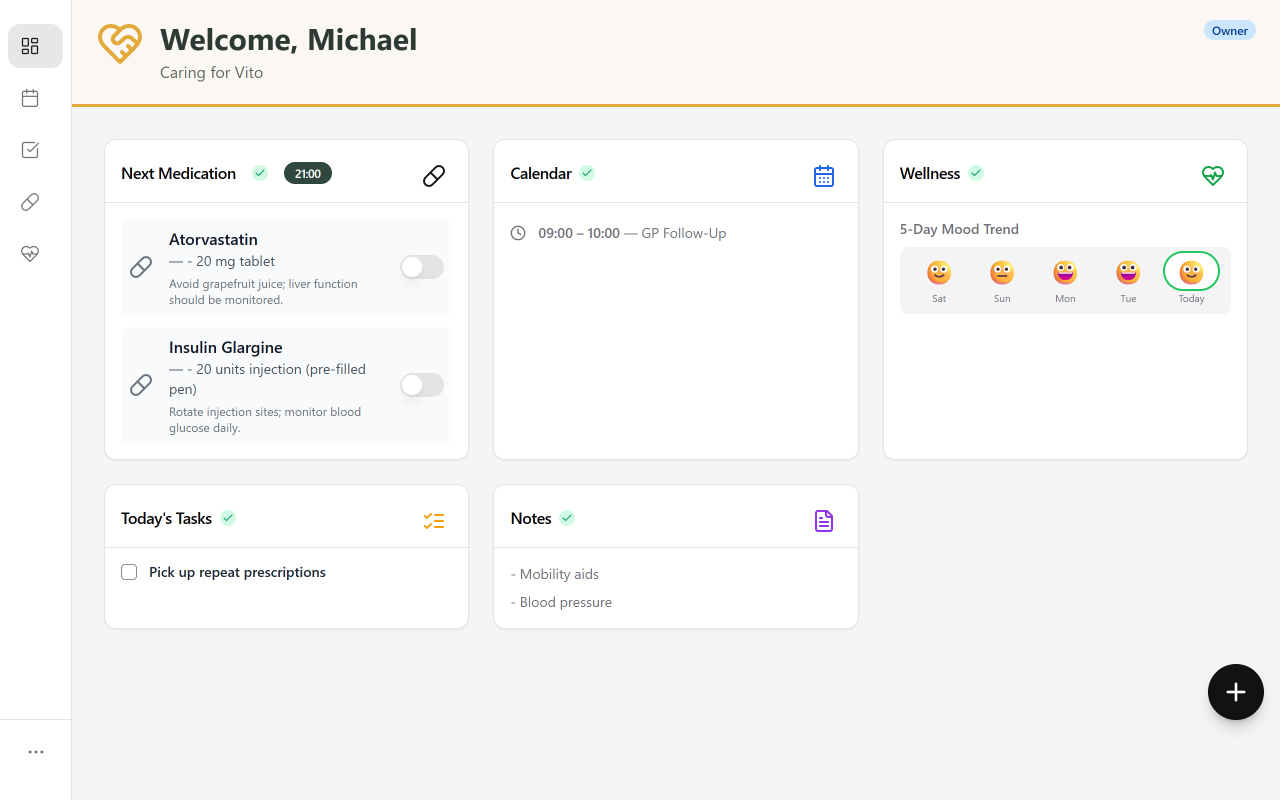
This is the point where a dedicated tool earns its place. In Kinclara, the family creates a Care Circle and adds the medications first — they’re usually the daily friction point. Name, dose, when it’s taken. From then on, everyone invited sees the same schedule.
That single step removes the relay. If the GP changes a prescription, one person updates it and the rest of the family sees the change — without anyone having to type out an explanation in the group chat.
Not everyone has to manage it. The sibling nearest usually does the updating. The others don’t need to do anything: view-only access means they can read the schedule and see what’s been logged without being asked to manage it. The family decides who sees what — and can change it at any time.
What it can look like
A picture of how this plays out — a composite drawn from what we see across beta families, not a single named case study:
Three siblings. Mum is 81, lives alone, four daily medications. Before: a WhatsApp group, a paper list on the fridge, and a recurring argument about whose turn it was to call.
They added the medications together on a Sunday afternoon. On day three, Mum’s GP changed one prescription — the daughter updated it, and the brother in London saw the change without a single explanatory message. On day seven, the sister who’d been carrying the most said she hadn’t had to chase anyone all week.
One thing worth saying plainly: Kinclara coordinates the family around the medications. It doesn’t give medical advice, and it isn’t a clinical tool. The schedule is whatever the GP and pharmacist have prescribed — the app just makes sure the whole family is looking at the same version of it.
Questions families ask
What if one sibling won't use an app?
The method still works. With a shared document, they can be sent the link or simply phoned. In Kinclara, view-only access means they can read the schedule without managing anything — and if they'd rather not use it at all, one person can relay to them while the rest of the family stays in sync.
Who should be allowed to change the schedule?
Fewer people than you'd think. One or two updaters keeps the schedule trustworthy — everyone else reads. In Kinclara, whoever creates the Care Circle decides who can edit and who has view-only access, and can change that at any time.
Is Kinclara free?
Yes. It's in free private beta, and core features will always be free to use.
Start with the one list tonight. If it holds, you’ve solved it for free. If it strains, the upgrade is 20 minutes away — and either way, no one has to be the only person who knows what Mum is on.